Ask our opticians

Ask Now

What Are Computer Progressives?

By Lilly Parla
Computer progressives help you see clearly at both close-up and intermediate distances, such as your monitor or keyboard, without tilting your head or switching glasses.
Computer Progressives

Overview

Also known as computer lenses or occupational lenses, computer progressives are tailored for digital and office environments. They are optimised for near to intermediate viewing distances, such as reading documents or using a computer, but are not suitable for driving or long-distance vision.

These lenses provide enhanced comfort during extended desk work by allowing your eyes to shift naturally between tasks, reducing (though not eliminating) the need for frequent head movement and helping you maintain a more relaxed posture.

How do computer progressive lenses work?

Computer progressive lenses are a specialised type of progressive lens designed for office and digital work. They offer a wider intermediate zone than standard progressives, ideal for screen distance and little to no distance correction.

Some designs are labelled as “office,” “desk,” or “room” lenses, depending on how far the intermediate zone extends.

Key features:

  • Upper portion: Optimised for viewing your computer screen at arm’s length.

  • Lower portion: Designed for close-up tasks like reading, writing or detailed work.

These lenses provide a smooth transition between zones, allowing your eyes to adjust naturally and helping you maintain comfort and proper posture, though some head movement may still be necessary.

Computer progressives vs regular progressive lenses

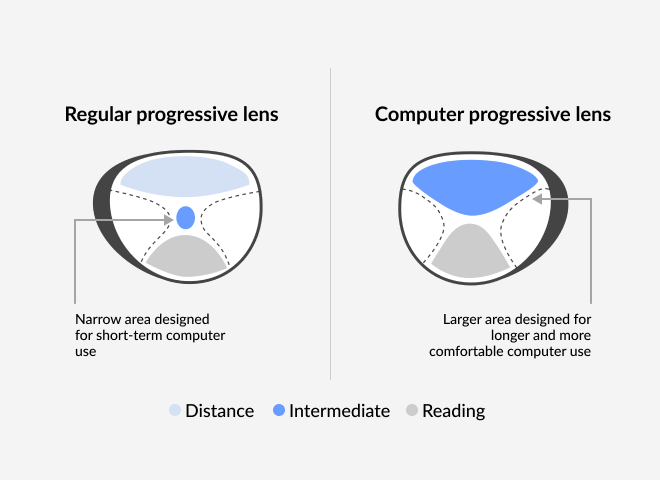
Infographic of computer progressives vs regular

Traditional progressive lenses help you see at all distances, from near to far. However, the part of the lens used for looking at a computer is small.

This limited intermediate zone in standard progressives often requires frequent head tilting or repositioning to find the right focus for screen distance, which can lead to discomfort during extended computer use. 

Since they are designed for all-purpose wear, including walking, driving and long-distance vision, standard progressives prioritise distance and near zones over the intermediate range.

Computer progressives enlarge that middle section, making it easier and more comfortable to see your screen without straining your eyes or neck.

Computer progressives vs blue light-blocking glasses

The key difference between computer progressive lenses and blue light glasses lies in their function.

Infographic of computer progressives VS blue light
EXPERT'S TIP!

“Want to improve your posture? Computer progressive lenses can help by reducing the need to tilt your head upward or downward to find the right focus for your screen. With a wider intermediate zone positioned for straight-ahead viewing, these lenses let you maintain a more natural posture throughout the day.”

Neggie Saadatpay-Wright, Dispensing Optician

How to set up your computer to get the most out of your computer progressives

To get the most out of your computer progressives, make sure your screen is positioned correctly. Follow these steps for optical setup:

  • Distance: Keep your screen about 25 to 30 inches from your eyes.
  • Height: Lower the monitor closer to the desk. Looking up for long periods can strain your neck.
  • Tilt: Angle the screen slightly upward for more comfortable viewing.
  • Lighting: Use proper lighting in your workspace to reduce glare and eye fatigue.

An extra tip from us! Try the 20-20-20 rule. Every 20 minutes, look at something 20 feet away for 20 seconds to help relax your eyes and prevent fatigue.

How to buy computer glasses at SmartBuyGlasses?

If you think computer glasses could help, ordering them from SmartBuyGlasses is simple:

  1. Choose your frames: Pick any style you like from our collection. For extra help, check out our guide on How to Choose Glasses.
  2. Select the “Occupational” lens type at checkout: this option is specifically designed for computer and office use.
  3. Upload your prescription: Ensure it includes both your distance and ADD values for accurate intermediate vision.
  4. Customise your lenses: Choose your preferred lens package and add the zFORT® Blue Light filter for extra screen protection.
  5. We’ll take care of the rest: our expert optical lab will craft your lenses to your exact specifications.

Conclusion

Computer glasses are an easy and effective solution for reducing eye strain and improving daily comfort. Whether you’re working, studying or gaming, they help keep your eyes relaxed and focused throughout the day.

For more expert advice on prescription eyewear and eye health, visit our Optical Center to explore more in-depth guides and resources.

Related articles

Do Computer Glasses Work?
Do you find that your vision is blurry when working at your desk? Is it distracting you from your work?...
View more
How To Find Glasses Prescription
Times are changing, and so is the way we can get our hands on things, including a copy of your...
View more

Related articles

Do Computer Glasses Work?
Do you find that your vision is blurry when working at your desk? Is it distracting you from your work?...
View more
How To Find Glasses Prescription
Times are changing, and so is the way we can get our hands on things, including a copy of your...
View more

Leave a comment

Your email address will not be published. Required fields are marked *